今日のカスタマーサポートエージェントは非常に強力です。SalesforceはFinを30億ドルで買収し、市場は急速に拡大し続けています。
しかし、これらのエージェントは完璧ではありません。問題が生じるのは、トレーニングされていない質問に答えようとしたり、データがなかったり、想定外の状況に対応しようとしたりするためです。
ユーザーがサポートチャットを開いて「レポートをエクスポートできない」と入力したとき、エージェントはその文章を認識しますが、そのユーザーが過去20分間にエクスポートフローを3回試み、毎回同じステップで失敗し、今や大文字で入力するほど苛立っているという事実は見えていないかもしれません。そのため、ユーザーがすでに試した一般的なウォークスルーを返してしまい、結局サポートチケットが送信されることになります。
ユーザーがエージェントに伝えることと、製品内での実際の行動との間にある洞察の欠如が、チケット抑制が機能しない原因です。しかし、CSチームは行動インサイトを活用してこのギャップを埋め始めています。
賢いエージェントでもサポートチケットが発生する理由
ほとんどのAIエージェントの導入は同じ構成から始まります。ナレッジベース、チャットインターフェース、そしてこの2つを組み合わせればほとんどのユーザーの問題を解決できるという合理的な期待です。シンプルで一次元的な質問に対しては、これで十分機能します。
問題は、ほとんどのサポートのやり取りがシンプルではないことです。それらは具体的です。6ステップのワークフローのステップ3で詰まっているユーザーは、その機能に関する一般的な回答を必要としているのではありません。ステップ3で何が問題だったのかについての助けが必要なのです。行動コンテキストを持たないエージェントは、その区別ができません。すべてのユーザーが同じに見え、すべての質問が履歴なしで届いたかのように扱われます。
エージェント導入後もチケット量が横ばいのままである理由
これが、本当に有能なAIエージェントを導入しても、チケット量が安定したままになる理由です。エージェントは、実際に何が起きているかに応答するために必要な情報の層を欠いているのです。
エージェント導入後もチケット数が横ばいのままである理由
これが、真に有能なAIエージェントを導入しても、チケット数が変わらない理由です。エージェントには、実際に起きていることに対応するために必要な情報のレイヤーが欠けています。
実際にはこのような状況が起きています:
- ユーザーがワークフローで問題に遭遇する。
- 何が問題なのか技術的な名称がわからないため、できる限り一般的な言葉でエージェントのチャットに問題を説明する。
- エージェントはキーワードを照合し、一般的なトピックに対応する回答を返すが、具体的な障害を見逃してしまう。
- ユーザーは提案を試みるが解決せず、チケットを送信する。
エージェントがチケットを防ぐために必要な情報を持っていれば、そのチケットは回避できたはずです。
行動シグナル:エージェントに欠けていたコンテキスト
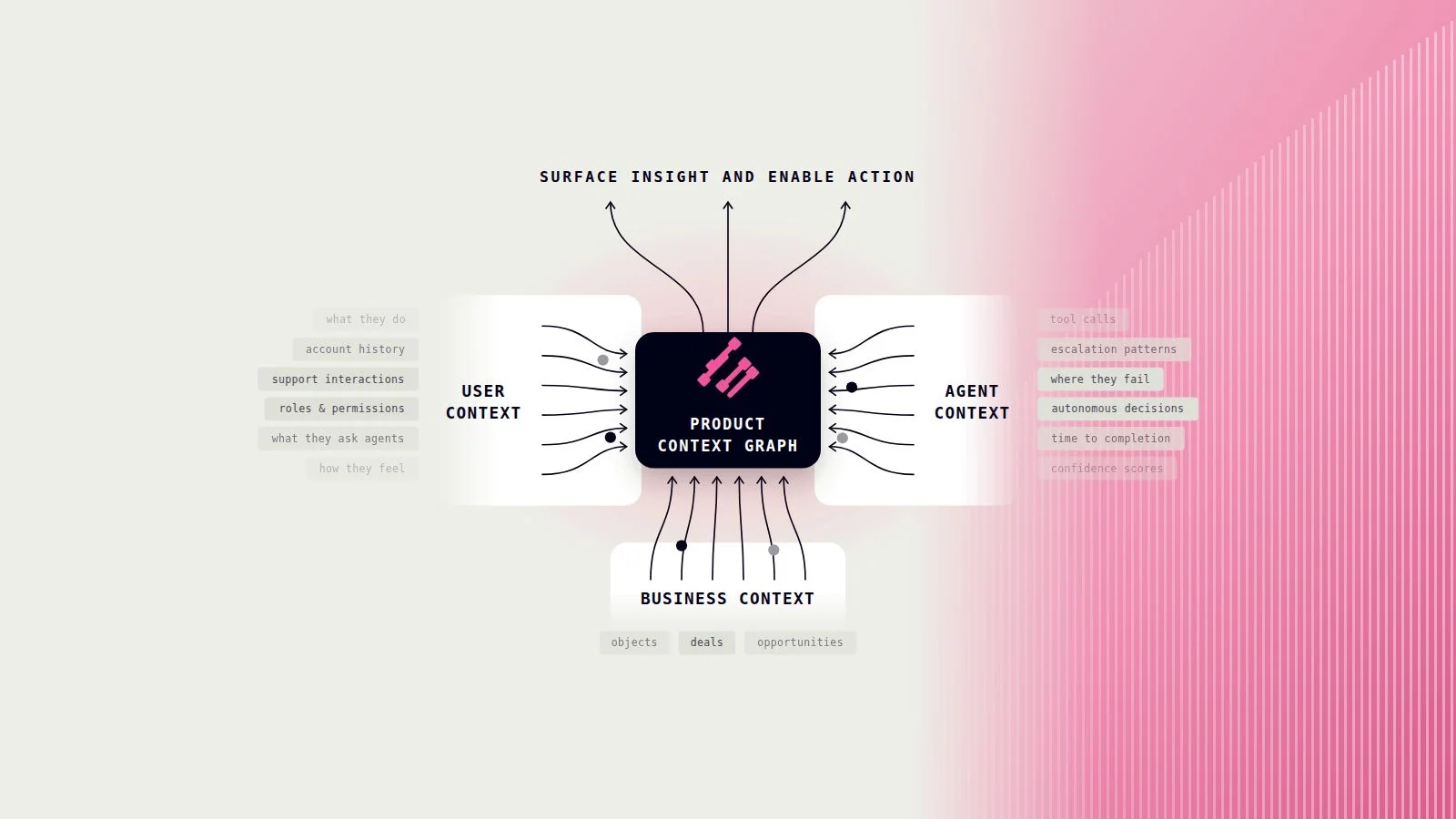
製品の行動データは、ナレッジベースでは得られない情報をエージェントに提供します。それは、会話が始まる前にユーザーが実際に製品内で何をしていたかという情報です。
チケット削減を促進する4つのシグナル
特に重要な4つのカテゴリがあります:
- 繰り返しの試みは、ユーザーが同じ操作を何度も試みたが成功しなかったことをエージェントに伝えます。これは、ユーザーが初めてその機能について質問している場合とは異なり、異なる対応が求められます。
- 離脱ポイントは、ユーザーがワークフローのどこで詰まったかを正確にエージェントに伝えます。単に詰まっているという事実だけでなく、具体的な箇所がわかります。ユーザーがステップ1から4を完了し、毎回ステップ5で離脱している場合、答えはステップ5にあり、ステップ1にはありません。
- フラストレーションシグナル(激しいクリック、繰り返し入力、素早い前後のナビゲーションなど)は、会話が始まる前にすでにユーザーの忍耐が限界に達していることを示します。最初の返答が的確でなければなりません。失敗の余地はありません。
- ユーザーコンテキストは、エージェントが話している相手が製品を使い始めて最初の1週間のユーザーなのか、エッジケースに直面しているパワーユーザーなのかを伝えます。新規ユーザーにはオンボーディングのガイダンスが必要です。パワーユーザーには具体的な解決策が必要です。これらは異なる会話です。
コンテキストがエージェントのやり取りを変える方法
エージェントが会話開始前にこれらのシグナルにアクセスできると、エージェントはすでに状況を把握しており、直接対応することができます。これはすべて、エージェントとのより良い会話を実現し、チケットを回避することを可能にするためのものです。
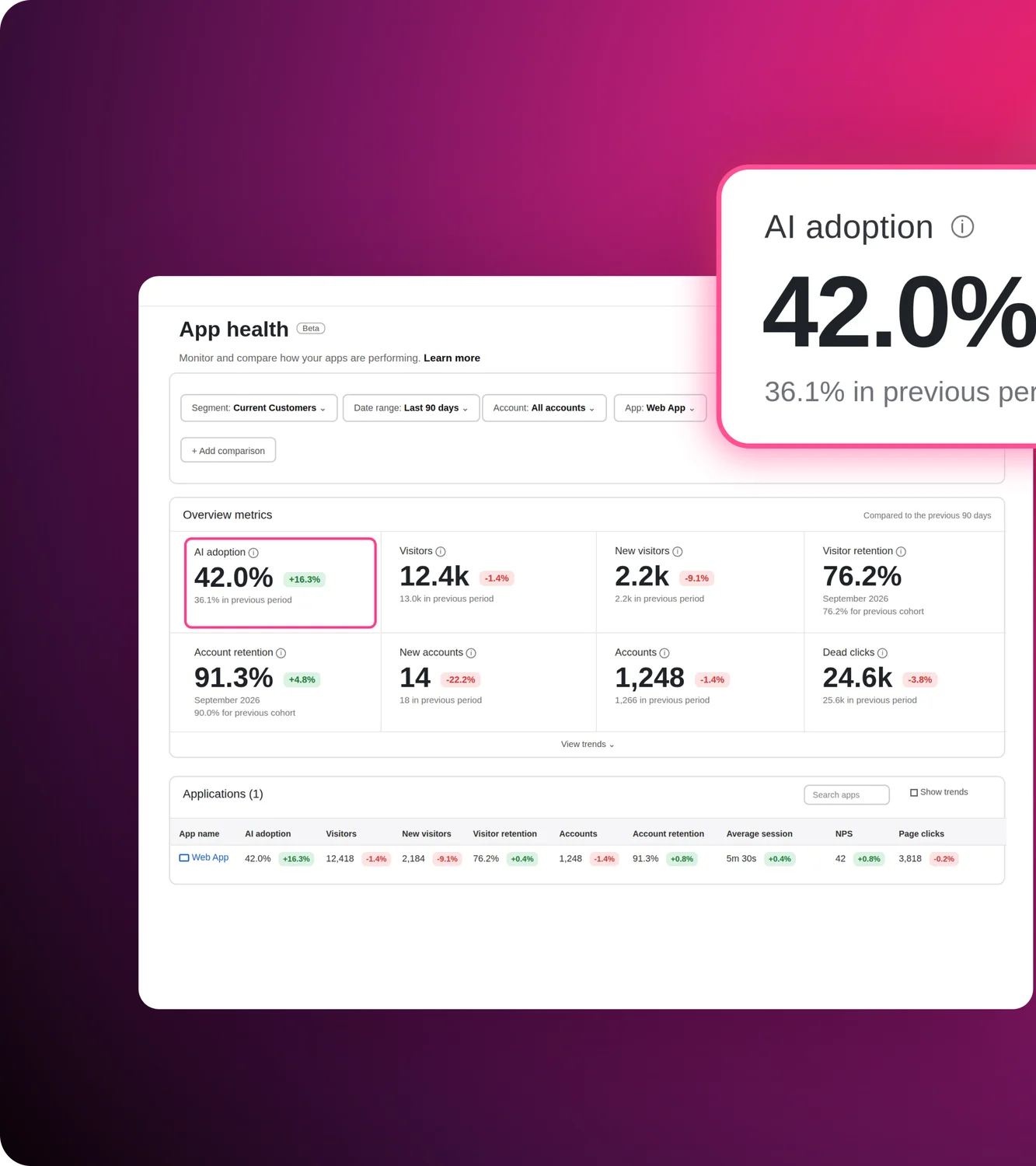
Pendo Agent Analyticsは、これらの行動シグナルをキャプチャして表示し、エージェントに欠けていたコンテキストレイヤーを提供します。
エージェントの可観測性:デフレクションが実際に起きているかを示す指標
行動データがエージェントに反映されたら、それが成果を上げているかどうかをエージェントの可観測性を通じて把握する必要があります。
解決率は、エージェントが人間への引き継ぎなしに会話を終了する頻度を示しますが、エージェントが失敗した場合の理由はわかりません。そのためには、もう一段階深く掘り下げる必要があります。
ITリーダーにとって重要なエージェント指標
- 激怒プロンプト率は、不適切な言葉、全て大文字、または繰り返しのリクエストを含むプロンプトを測定します。激怒プロンプト率が高い場合、エージェントが支援する前からユーザーがすでに不満を抱えていることを意味します。この数値が上昇している場合、会話前のエクスペリエンスに摩擦が生じており、それをエージェントが引き継いでいます。
- エージェントとのやり取り内での離脱率は、ユーザーがどこで離脱するかを示します。エージェントの2回目の応答後にユーザーが一貫して離脱する場合、問題は2回目の応答にあります。それは可視化できれば改善可能な問題ですが、まず見えるようにする必要があります。
- タスク完了率は、解決率が見落とす問いに答えます:ユーザーはエージェントが支援した操作を実際に完了したか?ユーザーはチケットを送信せずにチャットを閉じることができ、それでも問題が解決されていない場合があります。
これらの数値は、エージェントへの投資が予算レベルで正当化できるかどうかを示します。
Command Centerは、すべてのAIツールのパフォーマンスをポートフォリオレベルで把握できるビューを提供し、エージェント指標がサイロに閉じ込められることなく、AIスタック全体で何が機能しているかという広い視点に接続されます。
AIのROIを実践で証明:86%の会話が人間の介入なしで解決
ユーザーがワークフローで問題に直面します。行動シグナルがリアルタイムで収集されます。そのユーザーがエージェントチャットを開くと、エージェントはすでにコンテキストを把握しています:ユーザーが何をしていたか、どこで詰まったか、どれほど不満を感じているか。応答は具体的な状況に対処します。問題はチケットになる前に解決されます。
それがTeachableがFin(Pendoデータを活用)で構築したものです:
「FinはPendoデータを活用しているため、重要な瞬間に顧客を捉え、サポートチケットになる前に問い合わせを解決しています。すでにFinが人間を介入させることなく86%の会話を解決しており、CXスコア4/5を維持しています。」
— Kathleen Ross、プロダクトサポート アソシエイトディレクター、Teachable
なぜこれがサポート指標ではなくビジネス指標なのか
Finが人間への引き継ぎなしに解決するすべての会話は、測定可能なコスト削減につながります。それを実現しながらCXスコア4/5を維持しているということは、数字を達成するために品質が低下していないことを意味します。エージェントは実際のコンテキストを読み取るため、推測する必要がありません。
改善ループ:デフレクションが時間とともに向上する仕組み
初期デプロイはその一部に過ぎません。行動データは会話前にエージェントを準備し、会話後に修正すべき点を示します。同じポイントでレイジプロンプトの急増やドロップオフ率の上昇が繰り返される場合、エージェントの応答を調整し、特定の失敗に基づいて再トレーニングするか、ワークフローのギャップをプロダクトチームに伝えます。デフレクションが改善されるのは、初日に設定が正しかったからではなく、フィードバックループが継続的だからです。
行動データこそがデフレクションを実現する
ほとんどのAIエージェントは良い意図でデプロイされますが、修正可能な理由でパフォーマンスが低下します:コンテキストが不足しているのです。プロダクトの行動データがそのコンテキストです。会話が始まる前にエージェントを準備し、失敗している箇所を事後に明らかにし、IT責任者が投資が機能していることを証明するための可視性を提供します。
86%はシンプルな科学です:ユーザーが何をしていたかを知っているエージェントは、ユーザーが今何を言っているかしか知らないエージェントよりも多くの問題を解決します。